Showing Tree DataStructures in terminal
When working on college assignments involving tree data structures, one of the most challenging aspects is visualizing the tree in the console. While trees are easy to draw on paper, representing them properly in a terminal requires careful calculation of spacing and positioning. In this post, I'll walk you through the approach I used to print trees with proper level ordering and spacing.
The Challenge
Trees are hierarchical structures, and displaying them in a 2D console requires us to think about:
- How much horizontal space each node needs
- How to center parent nodes above their children
- How to maintain consistent spacing across levels
- How to handle different tree heights
Understanding the Spacing Pattern
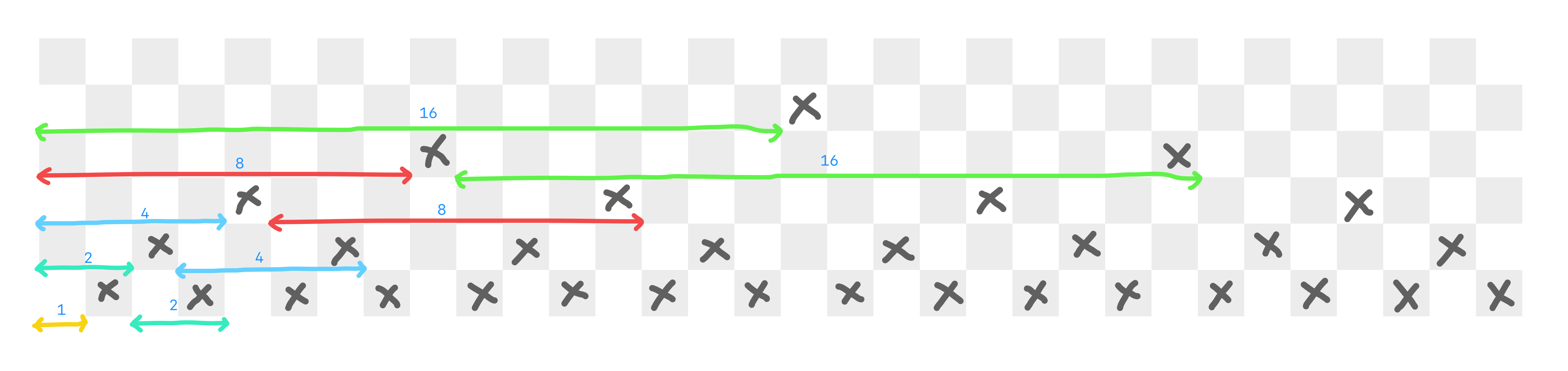
The key insight is that spacing follows a geometric pattern based on the tree level. For a balanced binary tree:
- Level 1 (root): 16 spaces from edges
- Level 2: 8 spaces between nodes
- Level 3: 4 spaces between nodes
- Level 4: 2 spaces between nodes
- Level 5: 1 space between nodes
Notice the pattern? Each level has half the spacing of the previous level. This makes sense because each level has twice as many nodes as the one above it.
The Algorithm
Here's the approach I used for printing trees in the console:
Step 1: Calculate Tree Height
First, we need to know the height of the tree to determine the initial spacing:
1int getHeight(Node* root) {
2    if (root == NULL) return 0;
3    int leftHeight = getHeight(root->left);
4    int rightHeight = getHeight(root->right);
5    return 1 + (leftHeight > rightHeight ? leftHeight : rightHeight);
6}
Step 2: Level Order Traversal with Spacing
We use a queue-based level order traversal, but instead of just printing values, we calculate and print appropriate spacing:
1void printTree(Node* root) {
2    if (root == NULL) return;
3
4    int height = getHeight(root);
5    int maxWidth = pow(2, height) - 1;
6
7    Queue* queue = createQueue();
8    enqueue(queue, root);
9
10    int level = 0;
11
12    while (!isEmpty(queue)) {
13        int levelNodes = pow(2, level);
14        int spacing = maxWidth / pow(2, level + 1);
15        int betweenSpacing = maxWidth / pow(2, level);
16
17        // Print initial spacing
18        printSpaces(spacing);
19
20        for (int i = 0; i < levelNodes; i++) {
21            Node* current = dequeue(queue);
22
23            if (current != NULL) {
24                printf("%d", current->data);
25                enqueue(queue, current->left);
26                enqueue(queue, current->right);
27            } else {
28                printf(" ");
29                enqueue(queue, NULL);
30                enqueue(queue, NULL);
31            }
32
33            if (i < levelNodes - 1) {
34                printSpaces(betweenSpacing);
35            }
36        }
37
38        printf("\n");
39        level++;
40
41        if (level >= height) break;
42    }
43}
Step 3: Helper Function for Spacing
1void printSpaces(int count) {
2    for (int i = 0; i < count; i++) {
3        printf(" ");
4    }
5}
Practical Example
Let's say we have a Binary Search Tree with values: 50, 30, 70, 20, 40, 60, 80
The output would look like:
       50
   30      70
 20  40  60  80
The spacing calculation for this 3-level tree:
- Level 1: 7 spaces before root
- Level 2: 3 spaces before first node, 5 spaces between nodes
- Level 3: 1 space before first node, 2 spaces between nodes
Handling Different Tree Types
Binary Search Trees
BSTs maintain sorted order, making them perfect for this visualization since the structure naturally shows the ordering property.
Heaps
For heaps (min-heap or max-heap), this visualization helps verify the heap property at each level. Parent nodes should be smaller (min-heap) or larger (max-heap) than their children.
General Binary Trees
The same approach works for any binary tree structure, though unbalanced trees might look skewed.
Optimization Tips
- Pre-calculate spacing: Store spacing values in an array to avoid repeated calculations
- Use string buffers: Build each level as a string before printing to avoid multiple print calls
- Handle NULL nodes: Print spaces for NULL nodes to maintain structure
- Limit tree height: For very tall trees, consider printing only a subset of levels
Common Pitfalls
- Off-by-one errors: Spacing calculations are tricky; test with trees of different heights
- Integer overflow: For very tall trees,
pow(2, height)can overflow - Memory leaks: Remember to free queue memory after printing
- Character width: Assumes single-digit values; multi-digit numbers need adjustment
Conclusion
Visualizing tree structures in the console is a valuable skill for debugging and understanding tree algorithms. While the spacing calculations can be complex, following the geometric pattern of halving spaces at each level provides a clean and readable output.
This approach helped me debug countless tree implementations during my data structures course, and I hope it helps you too. The key is understanding that tree visualization is all about managing spacing proportional to the tree's height and level.
Have you found other creative ways to visualize trees in the console? I'd love to hear about your approaches!